Experiment for Crash/Stall Sensor
One of the most important sensors on the Scribbler robot isn’t included in the Scribbler Observation Deck. The Stall Sensor, sometimes called a crash sensor, is located in the rear of the scribbler in the back wheel in the center. Even though this wheel isn’t powered by motors and we can’t programmatically control it, we can read what it is doing by using a question tile. Just like we can check for objects or lines, we can check to see if the rear wheel is moving or if it is stalled.
In order to get a feel for how it works and how sensitive it is, we need to write a program to use in experimentation. Unlike the other sensors where we could use the observation deck to review their usage; the only way to tell if the stall sensor is working is to run a program and see if it is triggered by using the question tile for the stall sensor.
To experiment with the stall sensor, follow the steps below:
- Open the Scribbler Program Maker on your computer.
- Start with a blank program or use the clear button to clear the worksheet
- Create this program:
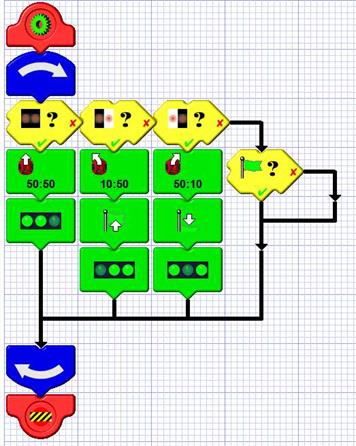
- In this program, we are using a loop to tell the Scribbler to drive straight. In that loop, we check the Stall/Crash Sensor. If the sensor is TRUE (which means it is stalled) the lights turn on. If the sensor is FALSE, (which means it is NOT stalled) the lights turn off. The program will continue to run until you turn off the Scribbler or upload a different program. In an actual activity, can you think of what else you might want to do other than just turn the lights on if the stall sensor is triggered?
- Experiment with the scribbler by letting the scribbler run and then picking it up. By picking up the Scribbler off the ground, we are simulating the situation where the back wheel is not turning and the front wheels are. This is what the Scribbler sees as a stall/crash.
- Do this several times and note how long it takes for the lights to turn on and back off. Is it the same every time? What could you do to make it more reliable? How would you use this sensor in a program where the Scribbler is moving around?