


Sytnax: PWM
' PWM.BS1
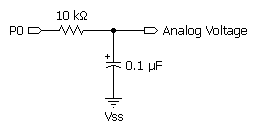
' Connect a voltmeter (such as a digital multimeter set to its voltage
' range) to the output of the circuit shown in the figure for the PWM
' command (in the manual).  Run the program and observe the readings on
' the meter. They should come very close to 1.96V, then decrease slightly
' as the capacitor discharges. Try varying the interval between PWM bursts
' (by changing the PAUSE value) and the number of PWM cycles to see their
' effect.

' {$STAMP BS1}
' {$PBASIC 1.0}


Main:
  PWM 0, 100, 10                        ' PWM at 100/255 duty (~50 ms)
  PAUSE 1000                            ' wait one second
  GOTO Main
  END
NOTE: The example below is written for the BS2 and will run on any of the BS2-family modules. Modify the $STAMP directive (as required) before downloading to the BS2e, BS2sx, BS2p, BS2pe, or BS2px.
' PWM.BS2
' Connect a voltmeter (such as a digital multimeter set to its voltage
' range) to the output of the circuit shown in the figure for the PWM
' command (in the manual).  Run the program and observe the readings on
' the meter. They should come very close to 1.96V, then decrease slightly
' as the capacitor discharges. Try varying the interval between PWM bursts
' (by changing the PAUSE value) and the number of PWM cycles to see their
' effect.

' {$STAMP BS2p}
' {$PBASIC 2.5}

#SELECT $STAMP
  #CASE BS2, BS2E
    CycAdj      CON     $100            ' x 1.0, cycle ajustment (for ms)
  #CASE BS2SX
    CycAdj      CON     $280            ' x 2.5
  #CASE BS2P
    CycAdj      CON     $187            ' x 1.53
  #CASE BS2PE
    CycAdj      CON     $09E            ' x 0.62
  #CASE BS2PX
    CycAdj      CON     $280            ' x 2.5
#ENDSELECT

Cycles          CON     50


Main:
  PWM 0, 100, (Cycles */ CycAdj)        ' PWM at 100/255 duty (~50 ms)
  PAUSE 1000                            ' wait one second
  GOTO Main
  END
BASIC Stamp Help Version 2.5.4
Copyright © Parallax Inc.
8/8/2012